 Sales: 03300 885 250
 SUPPORT
 LOGIN
LOGIN


Email inboxes are busy, crowded places these days. Brands are trying to reach their customers. Scammers are trying to reach anyone. Filters are doing their best to keep the nonsense out.
And in the middle of all that sits something called BIMI – a newer standard that helps your legitimate emails stand out and get trusted.
If you’ve ever wondered why some companies get their logo showing next to their messages, this is how they’re doing it.
Let’s break it down in proper plain English.
So… what is BIMI?
BIMI stands for Brand Indicators for Message Identification — which is a very wordy way of saying:
“Show your logo next to your emails, but only if you’ve proven you’re genuine.”
It’s an email authentication standard that works alongside things like SPF, DKIM, and DMARC.
If SPF, DKIM and DMARC are the ID checks, BIMI is the bit that proves you’re genuinely you.
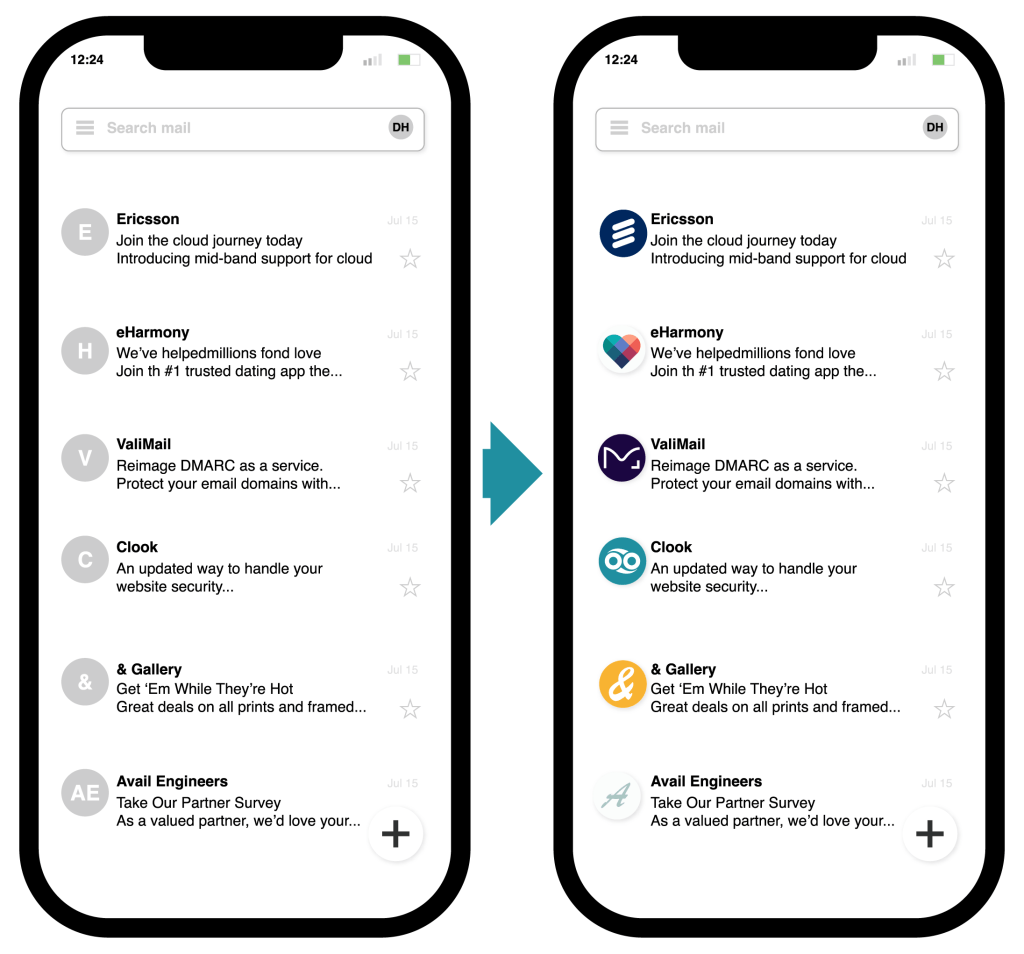
When everything is set up properly, supported inbox providers like Gmail, Yahoo, Apple Mail and others will pull in your brand logo and display it next to your message. It’s a simple visual cue, but it has a big impact.
Why does BIMI matter?
1. Better deliverability
Inbox providers trust authenticated senders more. BIMI is like an extra tick in the “they’re legit” box.
It won’t magically fix bad sending habits, but it’s a strong signal in your favour.
2. Immediate brand recognition
A logo in the inbox makes your message instantly visible.
Among all the plain-text senders, your brand becomes the one people actually notice. — which means higher open rates, more trust, and fewer “who on earth is this?” moments.
3. Stronger anti-phishing protection
Phishing relies on impersonation.
BIMI makes that much harder, because to even qualify, you need:
- Proper SPF and DKIM
- A strong DMARC policy (quarantine or reject)
- A verified trademarked logo
- A VMC certificate from a trusted authority
Scammers aren’t jumping through those hoops.
Need help setting up SPF, DKIM, DMARC or BIMI?
Our team can walk you through the whole thing — no jargon, no faff.
👉 Raise a ticket and we’ll get you sorted.
4. A cleaner, more professional inbox presence
For a brand, where trust and clarity are everything, a little logo next to your mail is a no-brainer.
How BIMI actually works
Here’s the short version:
- You publish DMARC with a strict policy.
- You add your BIMI record to DNS — this includes the URL to your logo.
- You get a VMC (Verified Mark Certificate) if your inbox provider requires one.
- Supported mail providers check that everything lines up.
- If you meet the requirements, your logo will show. If not, it just won’t appear yet.
Your logo must be an SVG Tiny PS format.
Do you need BIMI?
Not technically.
But should you consider it in 2025 and beyond? Absolutely.
If you send anything like:
- Account notifications
- Billing messages
- Security alerts
- Newsletters
- Sales emails
- Support communications
…then you benefit from stronger authentication and better visibility in your customers’ inboxes.
Put simply: It’s one of the easiest ways to look more trustworthy while keeping your deliverability healthy.
Want your logo to appear in inboxes?
We’ll guide you through BIMI setup from start to finish.
👉 Contact our support team.
Is BIMI supported everywhere?
Not yet — but the major players are on board, including:
- Gmail
- Yahoo Mail
- Apple Mail
- Fastmail
- AOL
- A growing list of others
Support is expanding quickly. Inbox providers want safer email environments, and BIMI is an easy win for them.
Setting up BIMI with Clook
If you’re hosting your DNS or email with us, we can help you get BIMI configured properly.
There’s no “one-click BIMI” button yet (if only), but it’s straightforward if you know your way around DNS zones.
You’ll need:
- SPF & DKIM correctly set
- DMARC with at least quarantine
- A trademarked logo in the correct SVG format
- A VMC (if required)
If you want us to walk you through it, or handle the setup, raise a ticket — we do this stuff all the time.
Final thoughts
Email is still the backbone of online communication, but it’s also full of noise, spam, and lookalike scams.
BIMI is one of the few modern standards that genuinely helps everyone: inbox providers, brands, and customers.
And for UK businesses who want to appear credible — and reach inboxes reliably — getting BIMI in place is well worth the small amount of effort.
If you fancy adding it to your domain, give us a shout. We’ll help you sort it quickly and painlessly.
Not sure where to start with email authentication?
Check out our breakdown of SPF, DKIM and DMARC.
👉 Learn about our Email Security & Trust Products.


